Remote Desktop - OneDrive Single Sign On
Install OneDrive per-machine on a Remote Desktop Session Host and enable Files On-Demand, Known Folder Move and silent sign-in through Group Policy.
Install OneDrive per-machine on a Remote Desktop Session Host and enable Files On-Demand, Known Folder Move and silent sign-in through Group Policy.
What Virtual Desktop Infrastructure is, how it differs from session-based RDS, and how to build a VDI pool on Hyper-V from a Windows 10/11 template VM.
Let users subscribe to your RDS web feed with just their email address: add a public _msradc TXT record that points to the RDWeb webfeed.aspx URL.
Part 7 of the Server 2022 RDS series: install the Azure MFA NPS Extension on the RD Gateway, plus the REQUIRE_USER_MATCH and number-matching registry keys.
Video on syncing two separate Active Directory forests to one Azure AD tenant with a single AD Connect server, including the DNS forwarding between them.
Video on creating an external trust between two separate Active Directory domains on Server 2022 so users from each side can reach the other's resources.
Video on using the free CodeTwo Active Directory Photos tool to manage user profile photos in Active Directory and sync them to Azure AD.
Deploy Windows Hello for Business cloud Kerberos trust: create the Azure AD Kerberos server object, enable WHfB in Intune and push the cloud trust OMA-URI.
Video showing how to restore a full image backup from UrBackup onto a machine, completing the UrBackup server and client series.
Part 6 of the Server 2022 RDS series: add a second Session Host and configure it as a RemoteApp server so users run applications without a local install.
Fix the FSLogix 'Group Policy Client service failed the sign-in' error: find the user's SID and set RefCount to 0 under ProfileService\References.
Deploy the UrBackup client to all servers and workstations with Group Policy software installation, following the UrBackup server install video.
Install a UrBackup backup server for the lab environment. Video walkthrough of the server installation, followed by client deployment in the next part.
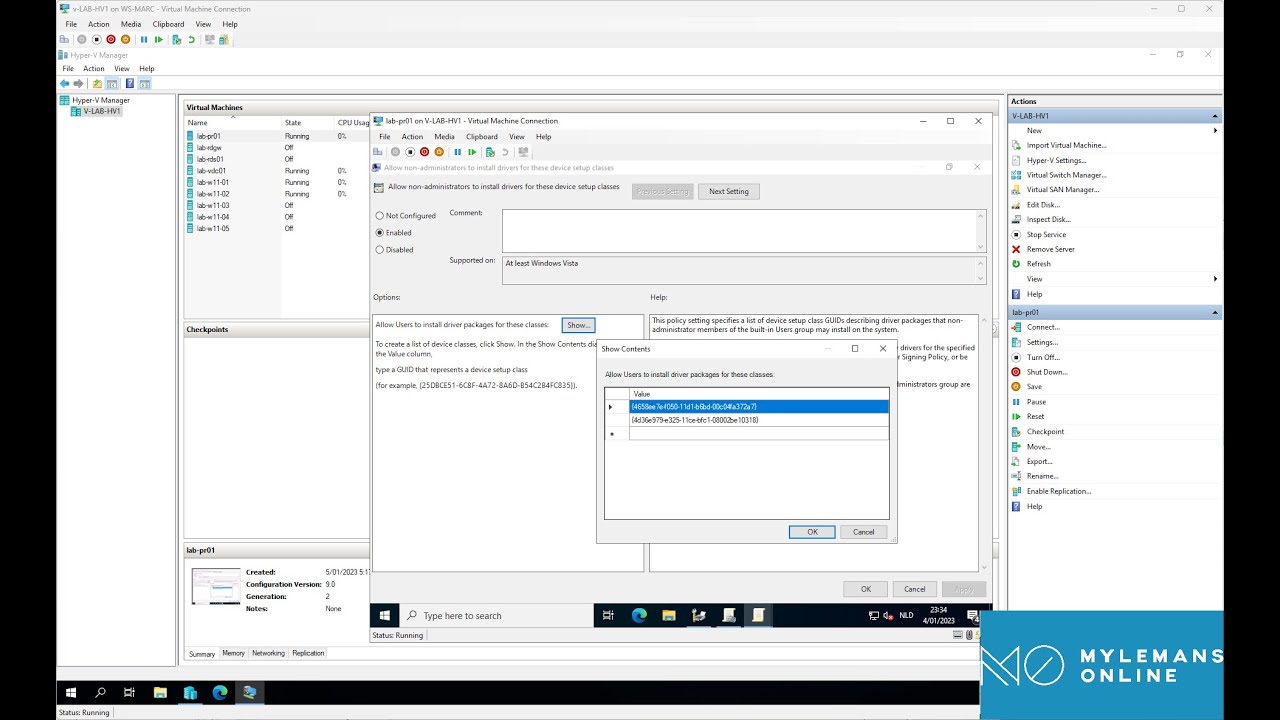
Let standard users install printer drivers on Windows 10/11 with one Group Policy: allow device installation for the Printer and PNPPrinters class GUIDs.
Configure the Point and Print Restrictions GPO on Server 2022 to trust your internal print server so clients install its drivers without elevation prompts.
Add the Print and Document Services role on Windows Server 2022, open Print Management, and deploy a shared printer to users with a Group Policy connection.
Part 5 of the Server 2022 RDS series: install the HTML5 Remote Desktop Web Client with the RDWebClientManagement module so users connect from a browser.
Part 4 of the Server 2022 RDS series: install Office 365 on a Session Host with shared computer activation so users sign in with their own licenses.
Part 3 of the Server 2022 RDS series: install and configure FSLogix so user profiles live on a file share instead of the Remote Desktop Session Host.
Strip local admins with Group Policy and give admin rights only to the workstation's Managed By user, via item-level targeting and two LDAP queries.
Autopilot for Hybrid Azure AD Join: install the Intune Connector for AD, create the OU, dynamic group, Autopilot profile and Domain Join profile.
Part 2 of the Server 2022 RDS series: create Group Policies for Remote Desktop Services that tune session performance and the user experience on the hosts.
Deploy the Office suite and apply Administrative Templates through Intune to Hybrid Azure AD joined Windows 11 devices from the earlier setup.
Set up Hybrid Azure AD Join for Windows 11 devices in an existing Active Directory and enable automatic MDM enrollment in Intune through Group Policy.
Install Azure AD Connect on Server 2022, start with a test group, add Seamless SSO via GPO and group-based licensing, then extend the sync to all OUs.
Part 1 of the Server 2022 RDS series: deploy Connection Broker, Session Host, Web Access and Gateway on two VMs with a Let's Encrypt certificate.
Import ADMX templates for Chrome, Edge, Foxit, OneDrive and Office into Active Directory and deploy third-party software with Group Policy on Server 2022.
Create Organizational Units in Active Directory on Server 2022 and build your first Group Policy Objects to manage users and computers from one place.
Install Active Directory Domain Services on Windows Server 2022, promote the server to a domain controller and set up the DNS role alongside it.
Create a Generation 2 VM on Server 2022 Hyper-V, enable the virtual TPM that Windows 11 requires and run through the Windows 11 installation.
Build a sysprepped VM template in Hyper-V on Server 2022 and deploy VMs from it with the included PowerShell script: CPU, RAM, VLAN and disks.
Enable Data Deduplication on a Server 2022 Hyper-V host and configure it to shrink the storage used by VM templates and VMs that share the same data.
Install the Hyper-V role on Windows Server 2022 through Server Manager and PowerShell, then do the initial configuration before creating your first VM.