

Manage Local Admins with Group Policy on Workstations
Strip local admins with Group Policy and give admin rights only to the workstation's Managed By user, via item-level targeting and two LDAP queries.
In this video we will be managing our Local Admins with Group Policy’s. In the first part i will show you how to delete all die local administrators and only leave the Domain Admins. In the second part we will be using the Managed By field in Active directory to assign a ‘Primary User’ to the workstation. With this the ‘Primary User’ has local admin rights only on that assigned workstation.
Screenshots + Ldap Query’s
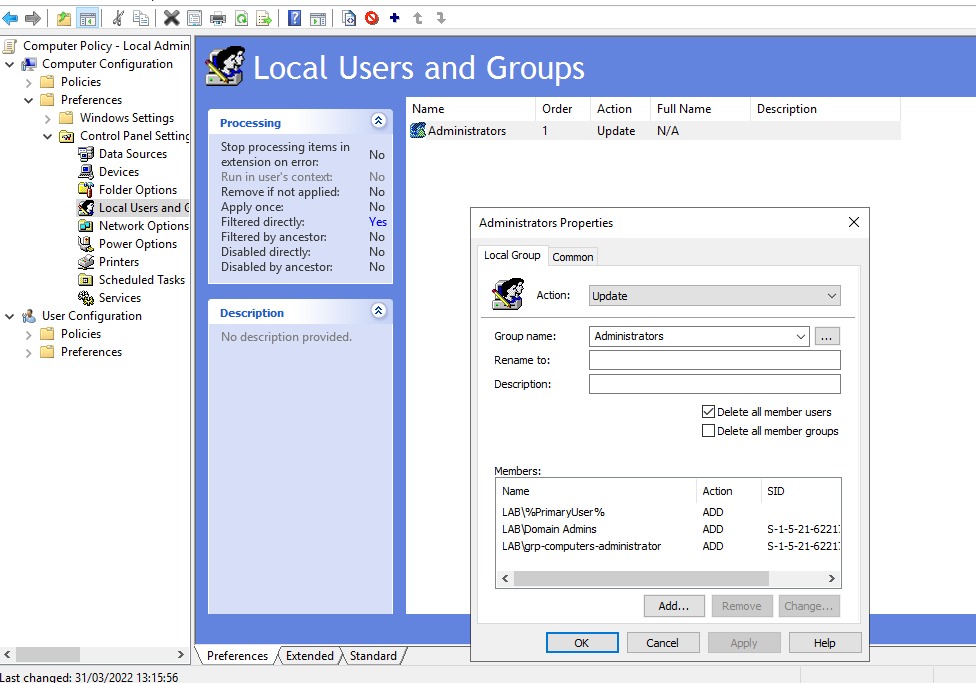
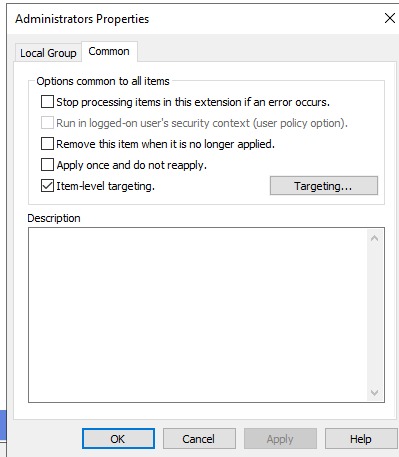
1st LDAP Query:
(&(objectCategory=computer)(objectClass=computer)(name=%COMPUTERNAME%))
managedby
PrimaryUser
2nd LDAP Query:
(&(|(objectClass=group)(objectClass=user))(distinguishedName=%PrimaryUser%))
sAMAccountName
PrimaryUser